
Your VDH clinic staff will ask you to enroll when you first come to the VDH clinic. Staff can help you begin the registration process. Once you agree to enroll for a care Portal account the clinic staff will send you an account registration invitation email. To set up the account you need to verify your identification at the website emailed to you:
- Enter your name if it is not automatically entered
- Enter your date of birth if it is not automatically entered for you.
- Answer the challenge question. The challenge question and answer depend on when you first asked your provider or registration staff member for an invitation. (If you don't remember the answer to your security question and answer, you will need to ask your provider or registration clinic team to choose a different one.)
- Click on the check box to agree to the Terms of Use Policy. (Click the links to view this policy.)
- Click on the button “Next, Create Your Account”. An account creation page is visible.
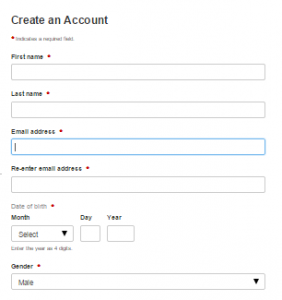
- Enter your first name and last name if they are not automatically entered for you.
- Enter your email address.
- Enter your date of birth and gender if they are not automatically entered for you.
- Create your username and password.
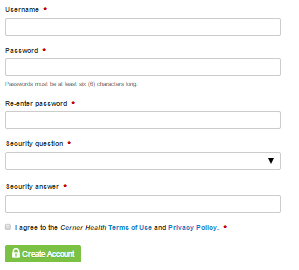
- Choose a security question to help you recover your account if you ever need to reset your password.
- Answer the security question.
- Select the check box to agree to the Terms of Use Policy. (Click the links to view these policies.)
- Click Create Account. You now have successfully created your account. Remember your username and password, as you will need to use them each time you log in to the patient portal.